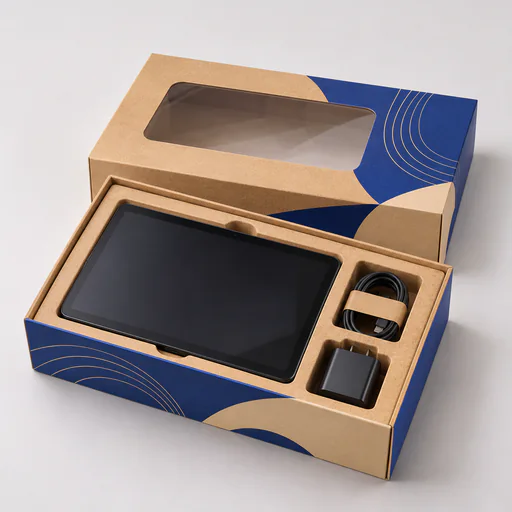
How to Choose Support Points for Electronics Boxes
Keep loads away from laptop screens, keyboard switches and headphone hinges with fitted supports and separate accessory pockets.
Choose support points around the device’s strongest surfaces. An insert should limit movement in the box while leaving clearance around controls, broad screens, ports, glass and other sensitive parts.
Measure the closed device
For laptop shipping boxes, measure the chassis, hinge and feet instead of ordering by screen diagonal. Support at suitable edges and keep loads off the broad faces. Give the charger a separate pocket so its plug cannot reach the laptop during handling.
For keyboard packaging cartons, check the highest keycap and any knobs with the feet folded. Long boxes can flex across a wide panel, so close a filled sample and inspect the clearance at the center. In headphone packaging boxes, use the approved folded angle and keep pressure off cushions and hinges.
Separate the accessories
Set independent compartments for cables, plugs, adaptors and accessories. Make each one easy to remove without dragging the device out of the tray. Check the tightest version for removal and the loosest for movement if one box serves several models.
Verify the shipment configuration
A retail case and a transit carton can have different jobs. Test the finished pack under appropriate handling conditions before committing to volume. Confirm any battery or special carrier requirements for the actual shipment. The printed outer carton is one part of that specification.
Bring a loaded sample, device drawings and the intended parcel route when comparing box packaging for electronics and tech.
Choosing supports for electronics boxes is one of our packaging guides fromCustom Boxes, written to help you specify custom laptop boxes and every other format in our range of custom box types.